> ## Documentation Index
> Fetch the complete documentation index at: https://docs.breet.io/llms.txt
> Use this file to discover all available pages before exploring further.
# Quickstart
> Get your Breet API credentials, set up authentication headers, and make your first API request in minutes.
## Prerequisites
* A [Breet Partner Account](https://partners.breet.io/register)
* Your **App ID** and **App Secret** from the dashboard
Don't have API dashboard access? Fill out this form to speak with our team and get set up.
## Step 1: Get your credentials
1. Log in to the [Breet API Dashboard](https://partners.breet.io).
2. Go to **Settings → For Developer**.
3. Create or copy your **App ID** and **App Secret (API Secret Key)**.
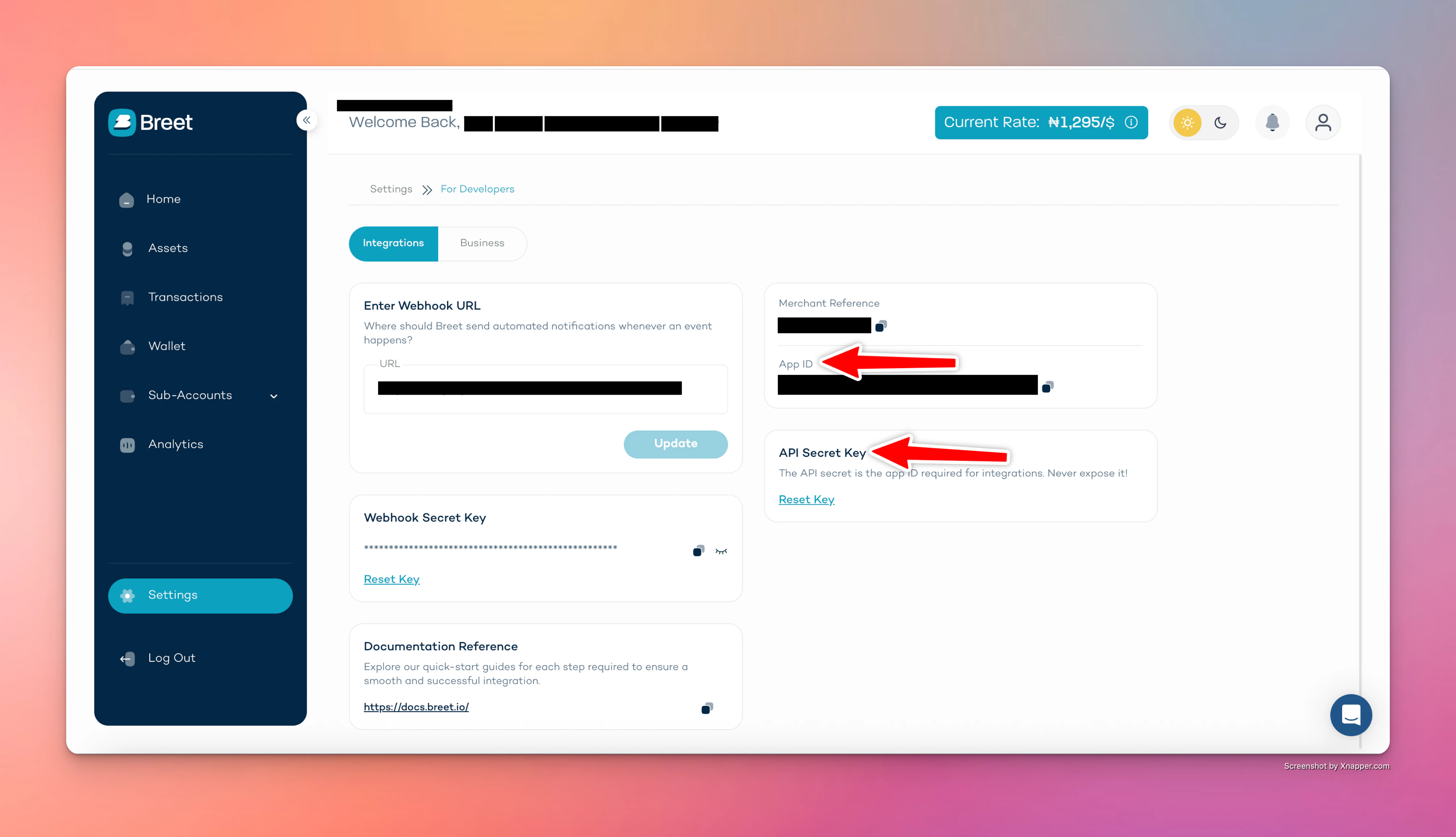 **Keep your App Secret safe.** Never expose it in frontend code, mobile apps, or public repositories. Store it in environment variables or a secrets manager.
## Step 2: Set required headers
Every API request must include:
| Header | Description |
| -------------- | ----------------------------- |
| `x-app-id` | Your App ID |
| `x-app-secret` | Your App Secret |
| `X-Breet-Env` | `development` or `production` |
## Step 3: Make your first request
**Base URL:** `https://api.breet.io/v1`
Example 1: list supported assets.
```bash theme={null}
curl -X GET "https://api.breet.io/v1/trades/assets" \
-H "x-app-id: YOUR_APP_ID" \
-H "x-app-secret: YOUR_APP_SECRET" \
-H "X-Breet-Env: development"
```
Example 2: generate a deposit wallet address (replace `ASSET_ID` with a valid asset ID from the assets list).
```bash theme={null}
curl -X POST "https://api.breet.io/v1/trades/sell/assets/ASSET_ID/generate-address" \
-H "x-app-id: YOUR_APP_ID" \
-H "x-app-secret: YOUR_APP_SECRET" \
-H "X-Breet-Env: development" \
-H "Content-Type: application/json" \
-d '{"label": "my-first-wallet"}'
```
## AI-powered docs
Connect our documentation to your AI coding tools via MCP so your assistant can search the Breet API docs while you build.
Install in Cursor
Install in VS Code
Copy MCP URL
The Cursor and VS Code buttons open the app directly if installed. For other tools or manual setup, copy the MCP server URL: `https://docs.breet.io/mcp`
## Next steps
* Read the [API overview](/api-reference/introduction) for full authentication and security details.
* Explore the [API reference](/api-reference/introduction) for all endpoints, request bodies, and responses.
* Enable [auto-settlement](/auto-settlement) to automatically convert crypto deposits to local currency and pay out to a bank account.
* Set up [webhooks](/webhooks) to receive real-time events when funds arrive or withdrawals complete.
* Learn about [pagination](/pagination), [error handling](/errors), and [rate limiting](/rate-limiting).
* Browse [use cases](/use-cases/fintech) to see how teams integrate Breet for fintech, e-commerce, payroll, and more.
* Try the **[API Demo](https://apidemo.breet.io)** to explore and test the API flows in an interactive environment.
**Keep your App Secret safe.** Never expose it in frontend code, mobile apps, or public repositories. Store it in environment variables or a secrets manager.
## Step 2: Set required headers
Every API request must include:
| Header | Description |
| -------------- | ----------------------------- |
| `x-app-id` | Your App ID |
| `x-app-secret` | Your App Secret |
| `X-Breet-Env` | `development` or `production` |
## Step 3: Make your first request
**Base URL:** `https://api.breet.io/v1`
Example 1: list supported assets.
```bash theme={null}
curl -X GET "https://api.breet.io/v1/trades/assets" \
-H "x-app-id: YOUR_APP_ID" \
-H "x-app-secret: YOUR_APP_SECRET" \
-H "X-Breet-Env: development"
```
Example 2: generate a deposit wallet address (replace `ASSET_ID` with a valid asset ID from the assets list).
```bash theme={null}
curl -X POST "https://api.breet.io/v1/trades/sell/assets/ASSET_ID/generate-address" \
-H "x-app-id: YOUR_APP_ID" \
-H "x-app-secret: YOUR_APP_SECRET" \
-H "X-Breet-Env: development" \
-H "Content-Type: application/json" \
-d '{"label": "my-first-wallet"}'
```
## AI-powered docs
Connect our documentation to your AI coding tools via MCP so your assistant can search the Breet API docs while you build.
Install in Cursor
Install in VS Code
Copy MCP URL
The Cursor and VS Code buttons open the app directly if installed. For other tools or manual setup, copy the MCP server URL: `https://docs.breet.io/mcp`
## Next steps
* Read the [API overview](/api-reference/introduction) for full authentication and security details.
* Explore the [API reference](/api-reference/introduction) for all endpoints, request bodies, and responses.
* Enable [auto-settlement](/auto-settlement) to automatically convert crypto deposits to local currency and pay out to a bank account.
* Set up [webhooks](/webhooks) to receive real-time events when funds arrive or withdrawals complete.
* Learn about [pagination](/pagination), [error handling](/errors), and [rate limiting](/rate-limiting).
* Browse [use cases](/use-cases/fintech) to see how teams integrate Breet for fintech, e-commerce, payroll, and more.
* Try the **[API Demo](https://apidemo.breet.io)** to explore and test the API flows in an interactive environment.